
Screen 13/14 - Smart management
Widgets and lock screen: know where your video is without opening the app
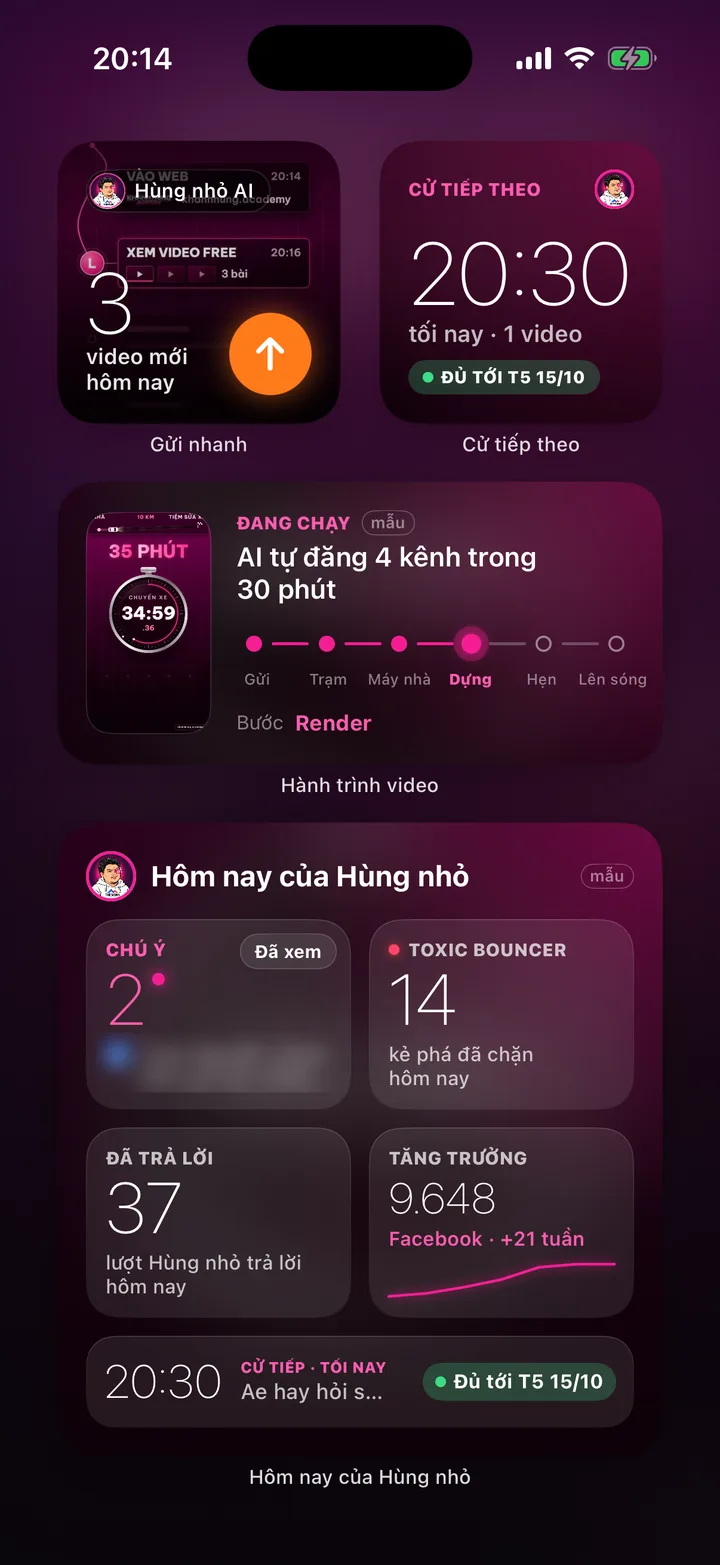
Home screen widgets, lock screen, Dynamic Island, Control Center buttons and Siri commands. Each step your video reaches shows right on the lock screen.
What this screen is for
Busy people have no time to open an app and check. The most important things go straight to the iPhone home screen and lock screen.
When you tap Send on a video, the lock screen shows a progress card: which of the 6 stages the video is at, from sending to going live.
The two things you do most, talking to the assistant and sending a new video, take one tap from outside the app.
Explainer video
Watch Khánh Hùng explain this feature
 1:44
How to use it
Touch and hold the iPhone home screen, tap add widget, choose the app. There are 4 widgets: Quick send (small), Next slot (small), Video journey (medium), Assistant today (large).
The Quick send widget shows how many new videos you recorded today. Tap the orange button to open the Publish video screen with the newest video already selected.
The Assistant today widget has 4 tiles: Attention, Toxic Bouncer, Replied, Growth. Tap a tile to open that screen. The Read button works right on the widget.
On the lock screen, add a circular widget (Attention count), a rectangular one (next slot time) or a single line of text.
After tapping Send, watch the lock screen or Dynamic Island to follow along: Sent, Station, Home machine, Edit, Scheduled, Live. Tap the card to open that video project directly.
Add the Talk to assistant and Send a new video buttons to Control Center, the lock screen or the Action button. Or ask Siri “What's on today” for a summary.
Behind the scenes, what the assistant does
Widgets pull numbers from the MONA AI Station: items needing attention, comments replied to, trolls blocked, the next slot, videos in progress, followers.
Widgets refresh on a schedule, faster while a video is being edited.
The progress card ends on its own when the video is done or waiting for your review.
What you get
- Glance at the lock screen to know what's on today, without opening the app.
- Follow a video from sending to going live like tracking a delivery.
- Send a video or give the assistant an order with one tap or one sentence to Siri.
Examples by industry
Between two surgeries, the doctor glances at the lock screen and sees 2 customers asked for prices and this morning's video at the Edit stage.
The lawyer maps Talk to assistant to the Action button, so one press is enough to say a task while walking to the parking lot.
The CEO puts the large Assistant today widget on the home screen and sees Attention, replies and growth in one frame every morning.
Want this app under your name?
An assistant with your name, photo and colors, on iPhone and Android.
Implementation process