
Screen 8/14 - Smart management
Schedule Facebook, TikTok and YouTube posts: what goes out today, which slots are still open
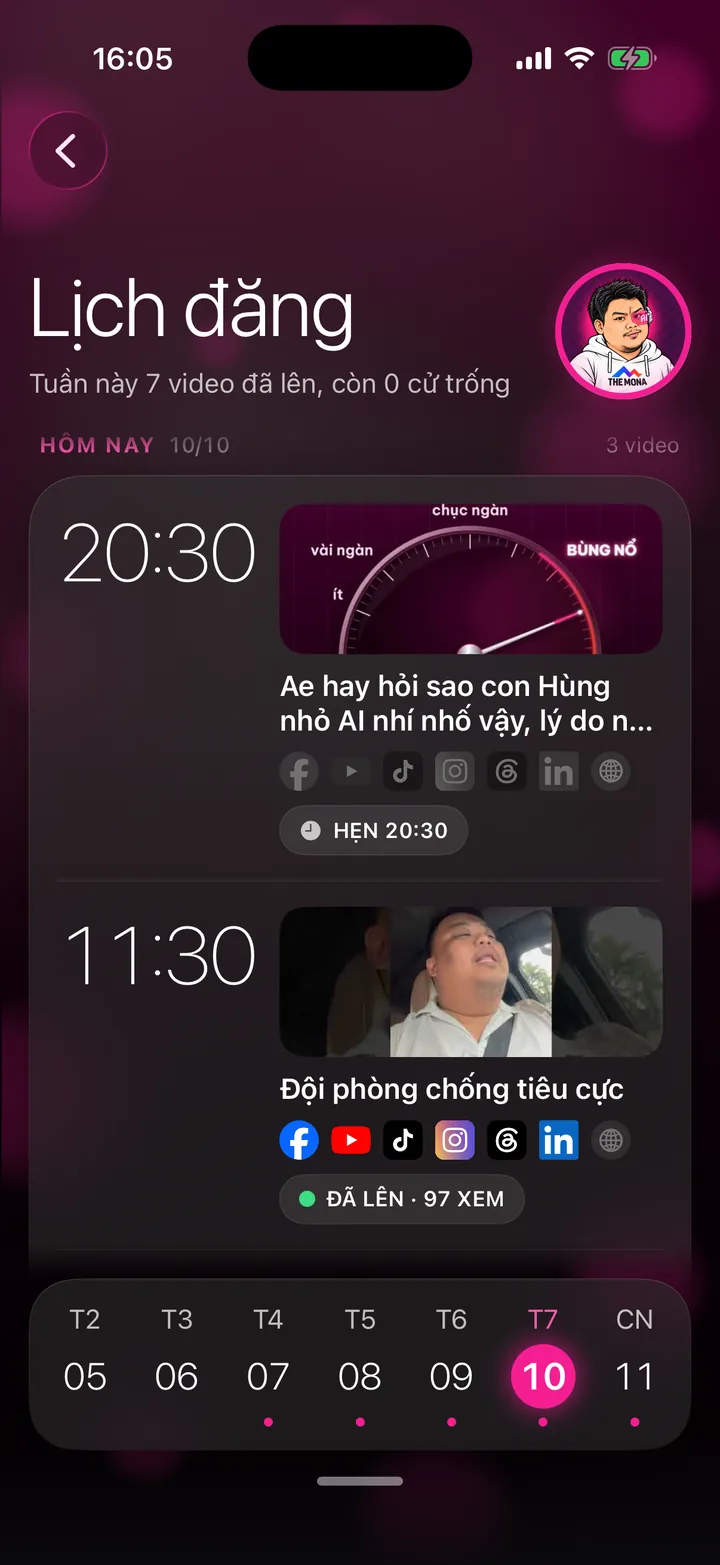
A day-by-day calendar: upcoming days on top, posted below, each slot with its video, status and views. Open slots remind you to send more videos.
What this screen is for
This screen answers two questions: which video goes live today, and which slots are still open.
The calendar runs by day. Upcoming days are on top, today is in the middle, posted days are below. The screen opens right on today.
Each video also has its own schedule per platform, because every social network has a different prime time.
Explainer video
Watch Khánh Hùng explain this feature
 1:05
App demo video - Posting calendar chapter, from 5:05
Watch Khánh Hùng open this screen in the real app
Watch the full video on YouTube
How to use it
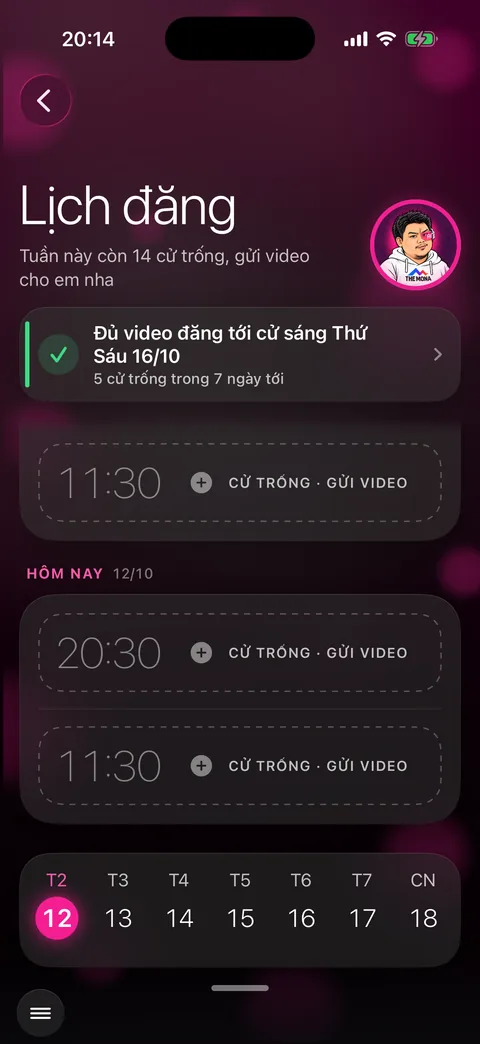
Open the menu in the bottom left corner and choose Posting calendar. The top of the screen has a one-line weekly summary, for example how many slots are still open.
Scroll up to see upcoming days, scroll down to see what's been posted.
Each slot shows the time, cover image, video title, a row of channel logos (lit up once live) and a status chip: Editing, Scheduled 20:30, Live on 3/7 channels or Live - 97 views.
Tap a slot with a video to open that video's details. Tap an open slot (the dashed Open slot - Send video box) to go to the Publish video screen.
Tap a day on the week bar at the bottom to jump to it. Swipe sideways for the previous or next week.
The card at the top tells you how far your video stock will last. Tap it to jump to the first open slot.
Schedule posts on Facebook and TikTok
You set the rhythm once in Posting schedule settings: 1 post a day, 2 posts a day, 1 post every 2 days or 3 posts a week, on which days and at what times. 07:30, 11:30, 17:30 and 20:30 are ready to pick, or type in any other time. Turn on Let MONA pick the best time and each channel favors the times it usually posts at.

Schedule Facebook posts
Posting times on Khánh Hùng's fanpage
- 07:00Morning short video
- 11:30Static post
- 20:30Evening short video
Videos go to the fanpage as Reels through Meta's official API, right at the scheduled time. The caption is written for Facebook alone, with no links and no asking for likes.
Turn on Also post to Story and videos up to 60 seconds go to Story at the same time. New comments under the post get a reply from the assistant within 1 to 4 minutes.

Schedule TikTok videos
Posting times on Khánh Hùng's TikTok channel
- 12:00Midday slot
- 20:30Evening slot
Times are tuned by the numbers: before the change, Khánh Hùng's TikTok videos posted at 20:30 averaged 781 views after 24 hours, while those posted at 11:30 got only 251.
TikTok's posting rules require the channel owner to choose for each post: who can watch, whether comments, Duet and Stitch are allowed, and to confirm the music policy. The app preselects nothing; once you confirm, the post goes live on its own at the scheduled time.
Videos longer than 10 minutes are not scheduled to TikTok. Captions can be up to 2,200 characters. TikTok messages can only be answered after the customer writes first, up to 10 messages within 48 hours.
Behind the scenes, what the assistant does
Your assistant puts each video in the nearest open slot and schedules it on each platform at that platform's own prime time.
When the time comes, the MONA AI Station posts it. Each channel the video goes live on lights up on the calendar, and views are collected after that.
If posting to a channel fails, the calendar shows the error so your assistant can deal with it.
What you get
- Your channels post steadily, with no empty day slipping by unnoticed.
- Know ahead of time when you'll run out of videos, so you can record more.
- Each channel posts right when its viewers scroll the most.
Examples by industry
A doctor opens the calendar on Sunday evening and sees an open slot on Wednesday. On Monday morning she records one more video and sends it.
A lawyer sees the inheritance video is live on every channel with a few hundred views, and taps the Facebook channel to open the post and read the comments.
A CEO about to go on a week-long business trip checks the top card, sees the stock lasts until Friday, and records 3 videos in a row before leaving.
Want this app under your name?
An assistant with your name, photo and colors, on iPhone and Android.
Implementation process