
Screen 11/14 - Smart management
Automatic comment replies: see who the assistant replied to, on which channel, and what it said
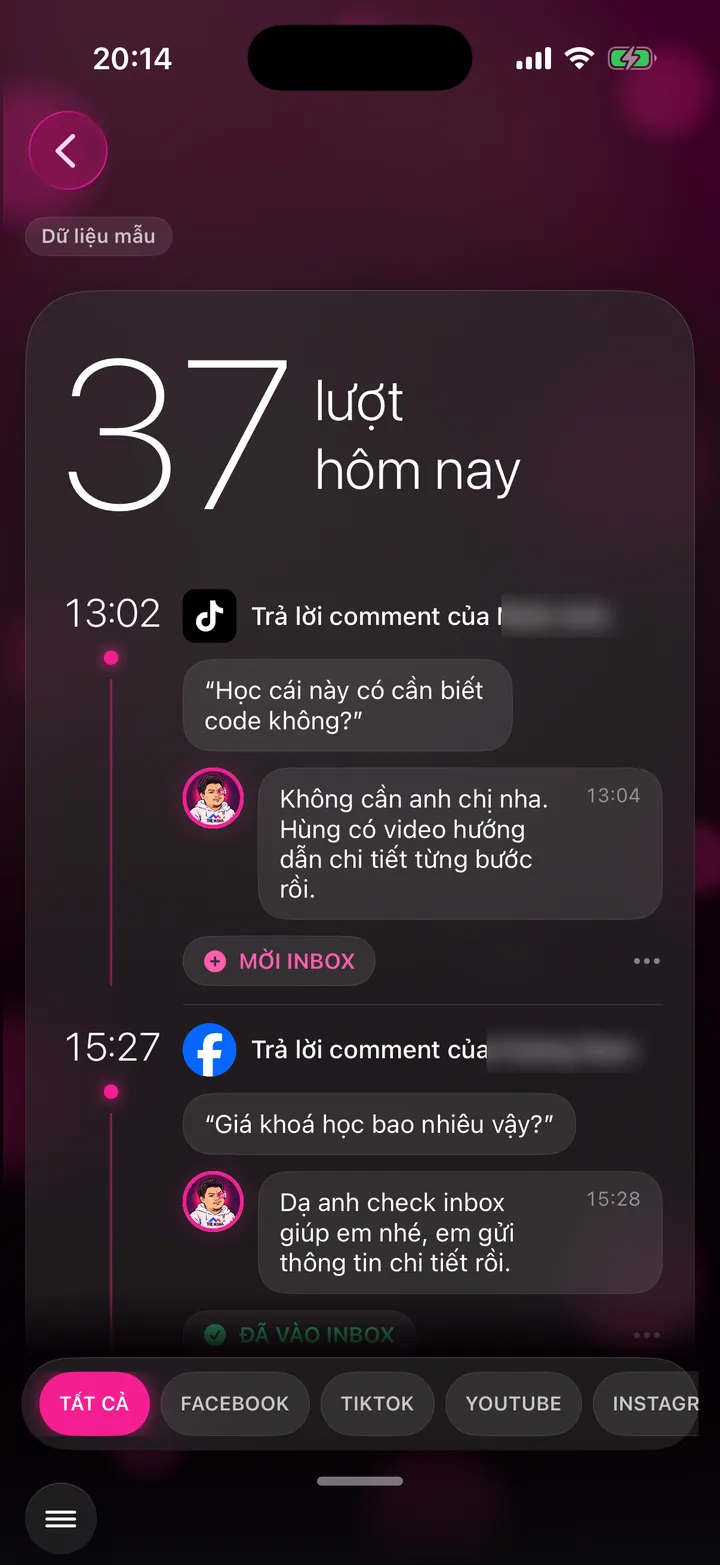

A timeline of every comment the assistant replied to today, with the customer's words, the reply, and whether the customer moved to messages.
This screen is part of the feature group for auto-replying to comments and messages with AI.
What this screen is for
The assistant replies to comments for you, signed with the assistant's name. This screen lets you check what the assistant told customers.
Every reply of the day, sorted by time, reads like a diary.
The tag on each entry tells you whether the assistant invited the customer to messages, the customer moved to messages, or it was a regular reply.
Illustrative example
Whenever customers ask, the assistant answers right then
The assistant watches comments and messages on all your channels. Customers get an answer within seconds, in your channel's voice. Anything you need to decide yourself, the assistant flags on the Attention screen.
Channel voice: polite and personal, warm and gentle
 Facebook - Comment under a videoLê Thu Trang
Doctor, what time does the clinic open?
Doctor's assistantThe clinic is open from 7am to 8pm, Saturdays included. Message us to book ahead so you won't have to wait when you arrive.
Replied in seconds
 Zalo - Private messagePhạm Quốc Bảo
My dad had heart surgery with the doctor last month. Our family would like to book a private follow-up with the doctor.
Doctor's assistantI've passed your message to the doctor. The doctor will message you back personally this morning.
Flagged on Attention for the doctor
 YouTube - Comment under a video@hoangmaianh
Such a clear video, thank you so much, doctor.
Doctor's assistantThank you for watching to the end. Tomorrow evening the doctor has a video on salty food and blood pressure, don't miss it.
Replied in seconds
 TikTok - Comment under a videoĐỗ Văn Tâm
I often get a tight feeling in the left side of my chest at midnight. Does that mean I have heart disease, doctor?
Expertise Fence: no diagnosis in comments
Doctor's assistantChest tightness needs an in-person exam to find the cause. Please see a cardiologist soon. If the pain is severe or you can't breathe, call 115 right away.
Replied in seconds
How to use it
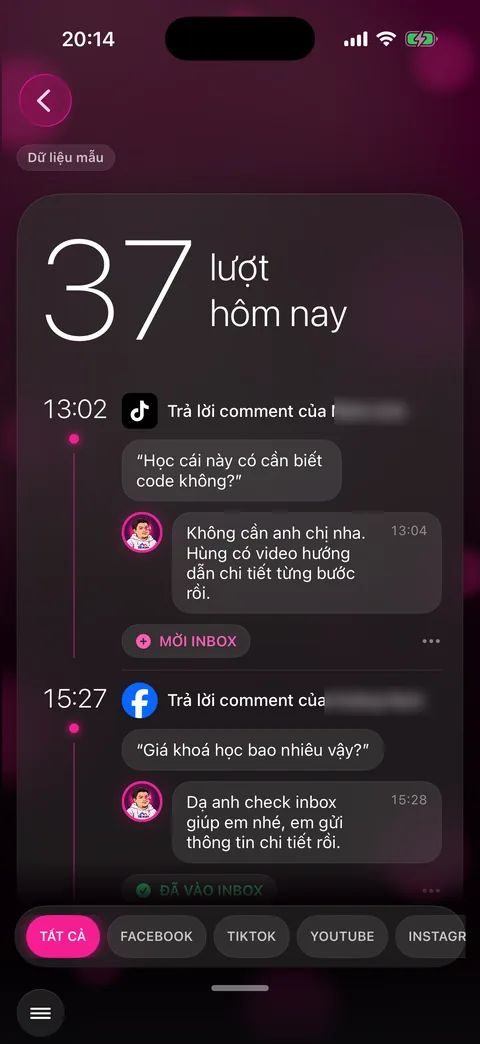
Open the menu in the bottom left corner and choose Hùng nhỏ replied (your app shows your own assistant's name).
The top of the screen shows how many replies the assistant made today.
Scroll down to the timeline. Each entry has the time, channel logo, commenter's name, the customer's words in quotes, then the assistant's reply with its time.
Check the tag under each entry: INVITED TO INBOX, IN INBOX.
Tap a channel chip at the bottom like FACEBOOK, TIKTOK, YOUTUBE to see just one channel.
Behind the scenes, what the assistant does
The assistant reads new comments on each channel and replies in your brand voice, using the knowledge MONA loaded into the assistant during setup.
Questions that need personal advice get an invitation to messages instead of a detailed answer in public.
Abusive or scam comments get no reply and go to Toxic Bouncer instead.
What you get
- Every channel has someone replying, even at midnight.
- Check reply quality without reading each channel.
- See how many customers move into messages each day.
Examples by industry
Before bed, the doctor scrolls the Replied screen and sees the assistant answered a medication question carefully and invited the person to book a visit instead of diagnosing in the comments.
The lawyer filters by the YouTube chip and rereads the assistant's replies under the video about home leases.
The CEO checks how many people were invited to messages today to see how many interested customers yesterday's video brought in.
Want this app under your name?
An assistant with your name, photo and colors, on iPhone and Android.
Implementation process